Why We Choose a Hybrid Approach of Ai & WordPress Website Builders .
AI can now produce a good-looking website in an afternoon. We use it ourselves every week, and it has changed how we design.
So when business owners ask whether they still need WordPress (or, as some now ask, whether they need a website at all), our answer isn’t “AI bad, WordPress good.” AI and WordPress are good at different parts of the job. AI is fast at creating the first version of a website. WordPress is built for managing, updating and growing that website for years afterwards.
That’s why we now use both. We design in AI, which saves a lot of time at the start of a project, then build on WordPress, using Astra as the base theme and Elementor or Beaver Builder as the page builder. The rest of this article explains why.
An AI website builder is the fastest way to get online. WordPress is the better choice for a business that plans to grow its website through new services, locations and regular content. For most growing businesses, the best result comes from using AI to design and WordPress to build and manage.
AI is very good at the first version .
Credit where it’s due. Tools like Wix, Squarespace, Durable and Framer can now generate a layout, write draft copy, suggest images and publish a working site in hours. Newer tools go further still. OpenAI’s ChatGPT Sites, also available in Codex, builds and publishes a website from a conversation, with no design or coding skills needed. For a business that has never had a website, that’s a big step forward. What used to need a designer, a developer and a few weeks can now be done by the owner on a quiet Sunday.
The results also look better than most people expect. The layouts are clean, modern and follow patterns that work: a strong opening section, services, testimonials, a clear call to action.
The trouble is that those patterns are the same for everyone. AI tools learn from what already exists, so AI-built sites tend to look alike. That’s fine on launch day. It matters more later, when the business needs its website to show what makes it different, and when it needs to grow.
A lot of that sameness comes down to the prompt. Ask an AI tool for “a website for a plumber” and you’ll get the same clean, generic layout everyone else gets. Give it your brand colours, fonts and tone of voice, the customers you want to reach, the services that make you money and examples of designs you like, and the result starts to look like your business instead of a template. The tool is the same either way. The brief is what changes the outcome.
Good-looking isn’t the same as optimised .
We’re seeing more and more websites that look great and that Google struggles to understand. Most were built quickly with an AI tool by someone without SEO experience, and once you know what to look for, they’re easy to spot.
The giveaway is usually the headings. A page’s H1 and H2 headings tell Google what the page is about and how it’s organised. On these sites, the headings are written to sound nice rather than to say anything: “Crafted With Care,” “Your Journey Starts Here,” “Excellence in Every Detail.” A visitor can look at the photos and work out what the business does. Google reads the headings and learns almost nothing. There’s no service, no location and none of the words a customer would actually search.
Take two glaziers. One site has an H1 of “Clarity, Redefined.” The other says “Glass Repairs and Shower Screens on the Central Coast.” Both might look equally polished, but only one tells Google what the business does and where it works.
The headings rarely come alone. SEO page titles are left as “Home,” images have no descriptions, every service is squeezed onto one page and nothing links to anything else. None of it is visible to visitors, which is how a site can look finished and still be close to invisible in search.
That isn’t the AI’s fault. It built what it was asked to build. The gap is knowing what search engines need, and it’s usually quick to fix for someone who does. It’s also one of the first things we look for in a website audit.
The hard part starts after launch.
Most business websites don’t stay small. A typical local service business might launch with a home page, an about page, a services page and a contact page. A year later it has added individual service pages, FAQs and a few blog posts. Three years in, a business investing in SEO can easily have 20 service pages, 30 location pages and a hundred articles, plus case studies and guides.
At that point the website isn’t a brochure anymore. It’s a working business asset, and the question changes from “how quickly can we build this?” to “how easily can we manage this?”
This is where the choice of platform shows up. Updating a price across ten pages, adding a new suburb, reorganising the blog or improving internal links is easy on a platform built to manage content. On a platform that wasn’t, it becomes slow, manual work that tends not to get done.
What a CMS does that most people never see.
A content management system (CMS) like WordPress doesn’t just store pages. It stores information in a database, along with how each piece of content relates to the others.
It knows which articles belong to which category, which pages are related, who wrote what and which content should appear in menus, archives and search results. When you publish a new blog post in the right category, it appears on the blog page, the category page and anywhere else it’s meant to, without you touching those pages.
A CMS stores the connections between your content, not just the content itself. That’s what lets a website grow from ten pages to two hundred without becoming a mess. It’s also what search engines and AI tools rely on to understand what your business does, which is why site structure matters so much for SEO in 2026 .
Many AI builders have a CMS too. The difference is control.
To be fair to the other side, “AI website builder” covers a wide range of tools.
Some, like Durable, ChatGPT Sites or a site generated by an AI coding tool, produce a working website from a prompt. Changes are made by asking the AI to edit the site, rather than through a content management system. Those are quick to launch and hard to grow, because there’s no content structure underneath to organise pages as the site expands.
Others, like Wix, Squarespace and Webflow, now combine AI design tools with a proper CMS. They have blogs, categories and structured content, and Webflow in particular handles related content well. For many small businesses, they’re a reasonable choice.
Over time, it comes down to four things:
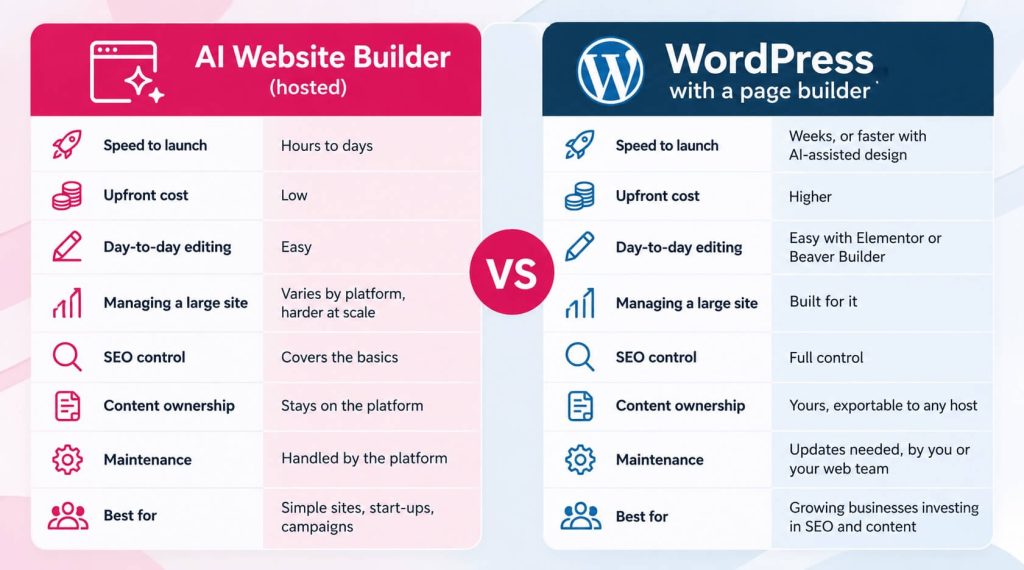
- Ownership. WordPress is open source. Your content can be exported and moved to any host. Hosted builders keep your site on their platform, and leaving usually means rebuilding.
- Flexibility. WordPress has tens of thousands of plugins, and almost anything a business needs has already been built. Hosted builders offer what the platform chooses to support.
- SEO control. WordPress gives full control over URLs, redirects, schema, site structure and internal linking. Hosted builders cover the basics well, but the limits show on larger sites.
- Choice of people. WordPress runs 40.2% of all websites, and 58.8% of sites where the CMS is known. If your web team changes, plenty of other people can pick up where they left off.
WordPress with a page builder is easier than its reputation.
WordPress has a reputation for being technical. Ten years ago that was fair. With a good theme and page builder, it isn’t anymore, and this is the part many business owners don’t expect.
On the sites we build, clients edit their pages visually. They click on the text or image they want to change, change it and see the result straight away. No code, and no need to call us to update a phone number or swap a photo.
The bigger benefit is how easy it becomes to grow. Page builders like Elementor and Beaver Builder let us create templates and global elements. Adding a new service page means duplicating a template and filling in the content, with the layout, branding and calls to action already in place. Change the header, footer or a shared section once and it updates across the whole site. Blog posts go through the standard WordPress editor, which most people pick up in a few minutes.
You can also give different people different levels of access. A staff member can write blog posts without being able to change the design or break the home page.
That combination (visual editing for day-to-day changes, templates for growth and a CMS underneath keeping it all organised) is what makes WordPress work for businesses that don’t want to be web developers.
We design in AI and build on WordPress.
Our process now has two halves, and each uses the tool that suits it.
We design in AI. The early stages of a project (layout options, page structure, visual direction and first-draft content) are where AI saves the most time. Design tools like Claude Design, from Anthropic, turn a brief into interactive page designs and prototypes in minutes. We can explore several design directions quickly, test ideas and get to an agreed design faster than we could a few years ago. That means more of the budget goes into what makes the site perform, rather than into producing early drafts.
We build on WordPress. Once the design is right, we build it properly on WordPress. We use Astra as the base theme because it’s lightweight and fast, and it doesn’t load features a site isn’t using. On top of that we use Elementor or Beaver Builder, depending on what the project needs.
Elementor is our choice for most business websites. It has a wide range of design options built in, and clients find it easy to edit. Beaver Builder is what we use for our fully integrated holiday accommodation websites, where the site connects with booking systems and the project needs more custom code and Sass (a language for writing and organising a site’s styling). Beaver Builder is lean and stable, and it gives our developers a clean base to build that custom work on, while still letting clients edit their pages visually.
The result is a site that was quicker to design, looks tailored rather than templated, and sits on a platform the business can grow into for years.
What WordPress asks of you in return.
A fair comparison has to include the downsides, and WordPress has some.
It needs looking after. WordPress, the theme and plugins need regular updates for security and compatibility. You need decent hosting, because cheap hosting makes any site slow. And page builders can add weight to a site if they’re used carelessly, which is why the base theme and how the site is built matter so much.
None of this is difficult, but someone has to do it, whether that’s you or your web team. Hosted builders take care of it for you, and that convenience is a real advantage for businesses that want nothing to do with maintenance.
How the options compare - AI vs WordPress.
Choosing the right one for your business.
An AI builder makes sense if you need a simple site quickly, you don’t plan to publish much content, and the website is a digital business card rather than a source of enquiries. Start-ups testing an idea, one-off events and short campaigns fit here too. Not every business needs WordPress, and we’d rather tell you that than sell you something you won’t use.
WordPress makes more sense if you’re investing in SEO, publishing content regularly, offering several services or working across several areas. If you expect the website to bring in enquiries and grow with the business, you’ll want a platform built for that from the start.
A useful test is to ask how many pages your site will have in three years. If the answer is “about the same as now,” a builder may be all you need. If it’s “a lot more,” plan for growth now.
The cost of starting again.
The cost of choosing the wrong platform rarely shows up in the first six months. It shows up in year two or three, when the business wants more pages, better structure and stronger SEO, and the platform can’t keep up.
Moving from a hosted builder to WordPress usually means rebuilding the site and moving content across page by page, along with redirects to protect any rankings the old site earned. It’s very doable, but it’s a project you can often avoid by choosing with growth in mind.
AI has made creating content and designs much easier. Organising, managing and growing that content is still the hard part, and that’s the job a CMS was built for.
Choose a platform that can grow with you.
AI has made building a website faster, and that’s good news for every business. But the real value of a website comes from what you do with it after launch: the pages you add, the content you publish and the way it all fits together.
If you’re weighing up an AI builder, a WordPress rebuild or a move from one to the other, we’re happy to talk it through. Our free website audit looks at where your current site stands, how well it’s set up to grow and whether your platform will keep up with your plans. It comes with a conversation, not a sales pitch. Get in touch to book yours, or see how we approach web design.
FAQs.
Is an AI website builder or WordPress better for a small business?
It depends on your plans. An AI builder suits a simple site that won’t change much. WordPress suits a business that plans to add services, locations and regular content, because it’s built to manage a growing site and gives you full ownership of your content.
Can an AI-built website rank on Google?
Yes. Google doesn’t rank sites based on the tool used to build them. It ranks useful content on a well-structured, fast site. Where AI-built sites often fall short is the basics a builder won’t fix for you, like headings that name your services and location, and page titles that match what customers search for. The limits of some AI builders show up later, when a site needs more pages, better structure and finer SEO control.
Can I move my AI-built website to WordPress later?
Yes, but it’s usually a rebuild rather than a simple transfer. Design and content are recreated in WordPress, and redirects are set up so you don’t lose rankings. The larger the site, the bigger the job.
Is WordPress hard to update yourself?
Not with a page builder. With Elementor or Beaver Builder, you edit pages visually by clicking on what you want to change. Blog posts use the standard WordPress editor, which most people learn quickly.
What’s the difference between Elementor and Beaver Builder?
Both are visual page builders for WordPress. Elementor has more design options and widgets built in, which suits most business websites. Beaver Builder is leaner and very stable, which makes it a better base for projects that need more custom development. We use Elementor for most business sites and Beaver Builder for our fully integrated holiday accommodation websites, where more custom code and Sass is required.
Does WordPress use AI too?
Yes. Page builders like Elementor now include AI tools for writing and design, and many WordPress plugins use AI. Our own approach uses AI for design and planning, then builds on WordPress for long-term management.